Welcome to the next pikoTutorial!
The minimal UDP server
A UDP server listens for incoming datagrams on a specified port and processes them as they arrive.
from socket import socket, AF_INET, SOCK_DGRAM
from argparse import ArgumentParser
# define command line interface
parser = ArgumentParser()
parser.add_argument('-ip', help='IP')
parser.add_argument('-server_port', type=int, help='Server port')
# parse command line options
args = parser.parse_args()
# create a UDP socket
with socket(AF_INET, SOCK_DGRAM) as server_socket:
    # bind server with a specific network address
    # which consists of IP and port number
    server_socket.bind((args.ip, args.server_port))

    print(f'UDP server up and listening on {args.ip}:{args.server_port}')
    # wait for the incoming data
    data, client_address = server_socket.recvfrom(1024)
    print(f'Received message from {client_address[0]}:{client_address[1]} : {data.decode()}')
    # send response to client
server_socket.sendto('Message received'.encode(), client_address)The minimal UDP client
A UDP client sends datagrams to a server and optionally receives responses.
from socket import socket, AF_INET, SOCK_DGRAM
from argparse import ArgumentParser
# define command line interface
parser = ArgumentParser()
parser.add_argument('-ip', help='IP')
parser.add_argument('-server_port', type=int, help='Server port')
# parse command line options
args = parser.parse_args()
# create a UDP socket
with socket(AF_INET, SOCK_DGRAM) as client_socket:
    # send message to server
    print(f'Sending message to {args.ip}:{args.server_port}')
    client_socket.sendto('Hello from UDP client!'.encode(), (args.ip, args.server_port))
    # receive response from server
    data, server_address = client_socket.recvfrom(1024)
print(f'Received response from {server_address[0]}:{server_address[1] }: {data.decode()}')Bidirectional communication
You can now create the following setup:
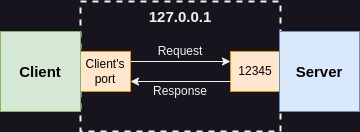
Note for beginners: on the image above, I didn’t put any specific number of the client’s port because in the first example that number is assigned by operating system at random. If you want to know how to specify the client’s port as well, you’ll find it in the second example.
Run server with the command below:
python3 server.py -ip 127.0.0.1 -server_port 12345And the client:
python3 client.py -ip 127.0.0.1 -server_port 12345You’ll see the following output in the server’s console:
UDP server up and listening on 127.0.0.1:12345
Received message from 127.0.0.1:36433 : Hello from UDP client!And in the client script output you’ll see:
Sending message to 127.0.0.1:12345
Received response from 127.0.0.1:12345: Message receivedSpecifying client’s port
In the previous example, although we defined the server port, the client’s port was randomly assigned by the operating system. If you need to specify the client’s port, you can bind it manually before connecting to the server:
from socket import socket, AF_INET, SOCK_DGRAM
from argparse import ArgumentParser
# define command line interface
parser = ArgumentParser()
parser.add_argument('-ip', help='IP')
parser.add_argument('-server_port', type=int, help='Server port')
parser.add_argument('-client_port', type=int, help='Client port')
# parse command line options
args = parser.parse_args()
# create a UDP socket
with socket(AF_INET, SOCK_DGRAM) as client_socket:
    # bind client to the specific address
    client_socket.bind((args.ip, args.client_port))
    # send message to server
    print(f'Sending message to {args.ip}:{args.server_port}')
    client_socket.sendto('Hello from UDP client!'.encode(), (args.ip, args.server_port))
    # receive response from server
    data, server_address = client_socket.recvfrom(1024)
print(f'Received response from {server_address[0]}:{server_address[1] }: {data.decode()}')If you run the above script with the following command:
python3 client.py -ip 127.0.0.1 -server_port 12345 -client_port 56789You’ll get the connection as presented on the image below:
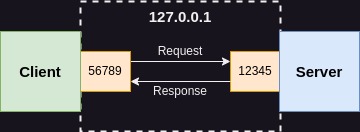
You’ll also see the client’s port number in the server’s logs:
UDP server up and listening on 127.0.0.1:12345
Connection established with 127.0.0.1:56789
Received message: Hello from UDP client!Read also:
- Bug of the week #13

- git log tricks you really should know

- Surprisingly necessary explanation of Python venv

- When AI gets C++ bitmask enums almost right

- 10 VS Code snippets essential for every C++ engineer

- Storing your ATTiny program in…EEPROM?

- Bug of the week #12
- Sharing variable between bash scripts

- A 40-line LLM-based bash command executor in Python
- GTest and short-circuit evaluation in C++
- AI is powerful. Snippets are instant.
- From AUTOSAR to S-Core: the first C++ pub/sub implementation
- How to write Arduino Uno code with Python?
- Combining Bazel with Docker

- Running commands with timeout on Linux
- Running Python unit tests with CMake
- Thirdparty dependencies with FetchContent
- Bug of the week #11
- Combining CMake with Docker
- How to search the internet from Linux terminal?
- Folding expressions in C++
- How to derive from an enum in Python?
- Bug of the week #10
- Trying ROS2: client/server within a single container
- Make C++ a better place #4: Go as an alternative

- How to convert hex to dec in Linux terminal?
- Setting up a Python project with CMake
- Separating builds for different configs with Bazel
- Trying ROS2: pub/sub within a single container
- Bug of the week #9
- UDP multicasting with Python
- Destruction order vs thread safety in C++
- Let’s review some code: C++ #2

- Make C++ a better place #3: D as an alternative
- Registering callback using std::function in C++
- Bug of the week #8
- TCP client/server with Python
- Simple menus in Bash scripts with select
- Calling member function on a nullptr in C++
- Bug of the week #7
- Python lru_cache explained
- How to dockerize a Python application?
- Make C++ a better place #2: CppFront as an alternative
- Parameters combinations in GoogleTest
- Data transfer with curl
- Python reduce explained
- Bug of the week #6
- Custom literals in C++
- Linux and hash command
- 5 Python good practices which make life easier
- Let’s review some code: Python #1
- Make C++ a better place #1: What does better mean
- Enums vs enum class in C++
- Bug of the week #5
- UDP client/server with Python
- Hard links in Linux
- Functions calling order in unit tests in C++
- Bug of the week #4
- Yield in Python – state machines, coroutines and more
- Copy files from another branch with Git