Why use snippets in the era of AI agents?
AI can generate code faster than ever. A single prompt can produce entire classes, build files or test suites in minutes, so it’s fair to ask: why would any engineer still care about VS Code snippets? Because generating code is not the same thing as maintaining flow.
Assuming that you’re not a vibe coder, you know that many repetitive engineering tasks are not difficult enough to justify opening an AI chat, writing a prompt, waiting for output, reviewing the result and adjusting it to match your project conventions. Ironically, for small but frequent tasks, AI often introduces the exact thing engineers try to avoid most: context switching.
And context switching is expensive.
Every time you stop coding to ask an AI assistant how to write a constructor, scaffold a test, remember a target_link_libraries signature or recreate a logging macro, you temporarily break concentration. Individually, these interruptions feel insignificant, but across an entire day, they quietly fragment momentum and slow down deep technical work.
Snippets solve a different problem than AI.
AI is excellent for exploration:
- learning unfamiliar concepts
- making PoCs
- generating drafts
- explaining APIs
Snippets excel at execution:
- known patterns
- repeated workflows
- reliability
- muscle-memory
A good snippet system removes friction without requiring a conversation. No prompting and no waiting for the code that may or may not match your expectations. You type a few characters, press Tab and continue thinking. That immediacy matters more than ever.
This article covers 10 VS Code snippets that I consider essential for every C++ developer. You can download all of them for free from my GitHub repository:
Including path copied to the clipboard
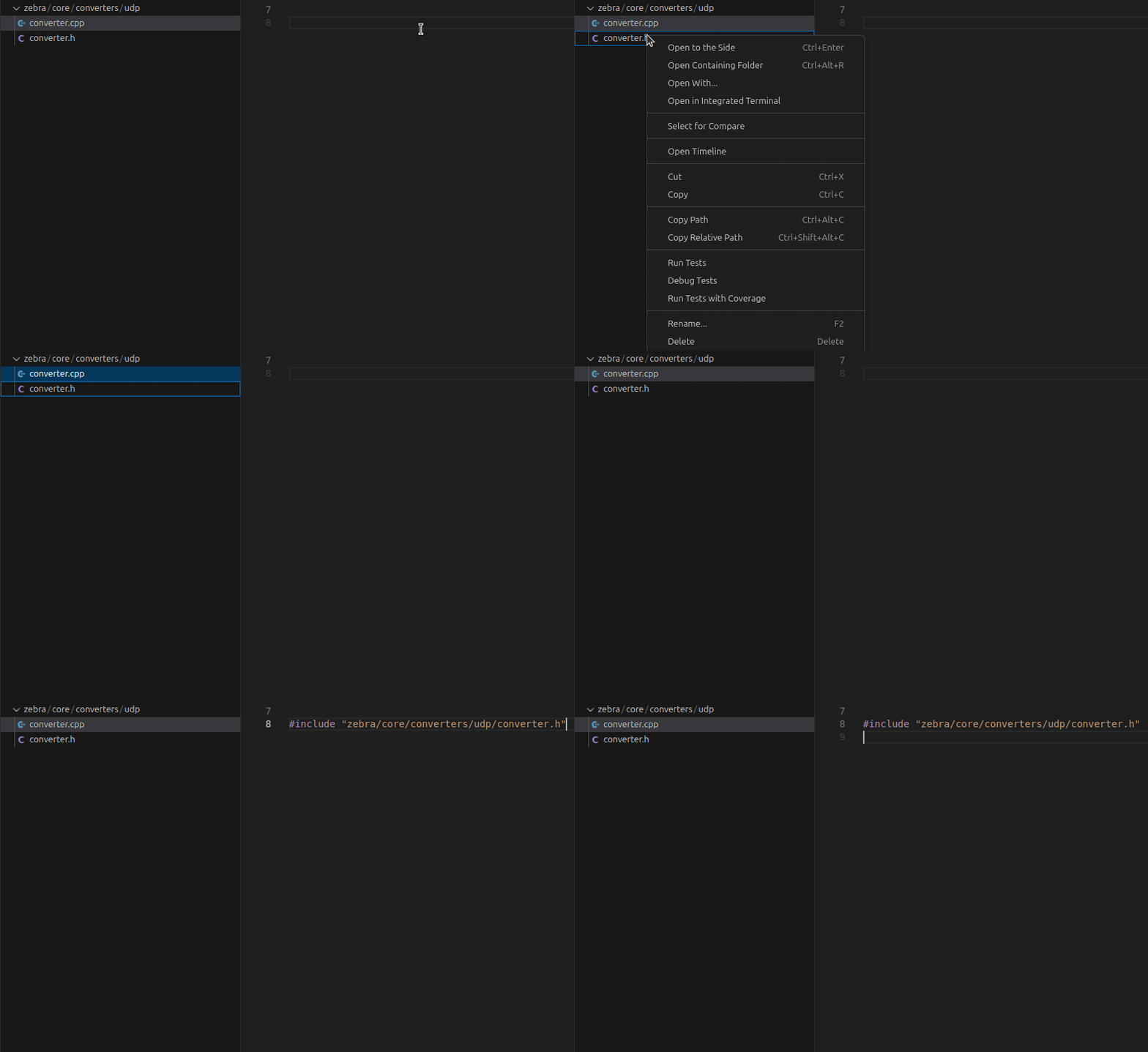
Snippet is called incb (abbreviation for: INclude ClipBoard) and lets you insert the include directive with whatever you have currently copied to the clipboard. If you work in Bazel environment and all your include paths are relative to the project root, then you can just click RMB on a file, choose “Copy relative path” and type incb.
Declaring new interface class
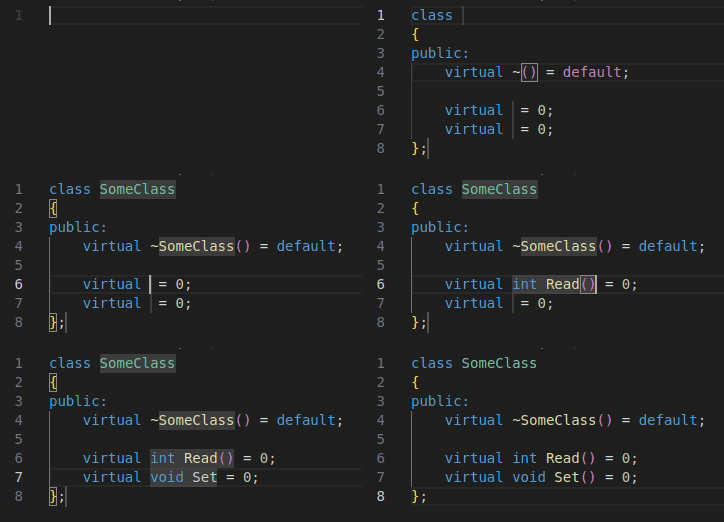
Snippet is called dif2 (abbreviation for: Declare InterFace with 2 method) and lets you declare a new interface class with the number of pure virtual methods specified by the trailing number (in this case 2).
If/else
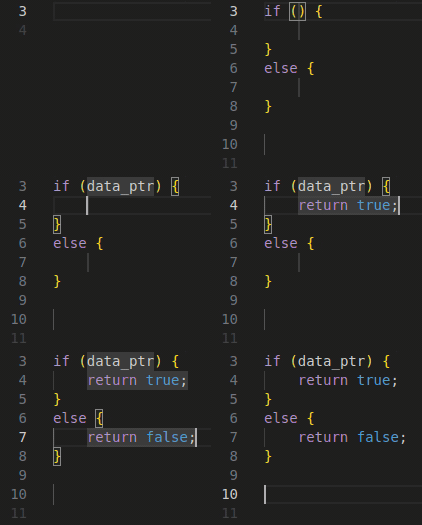
Snippet is called cife (abbreviation for: C++ IF Else) and lets you insert one of the most frequently typed blocks of code.
Switch-case statements
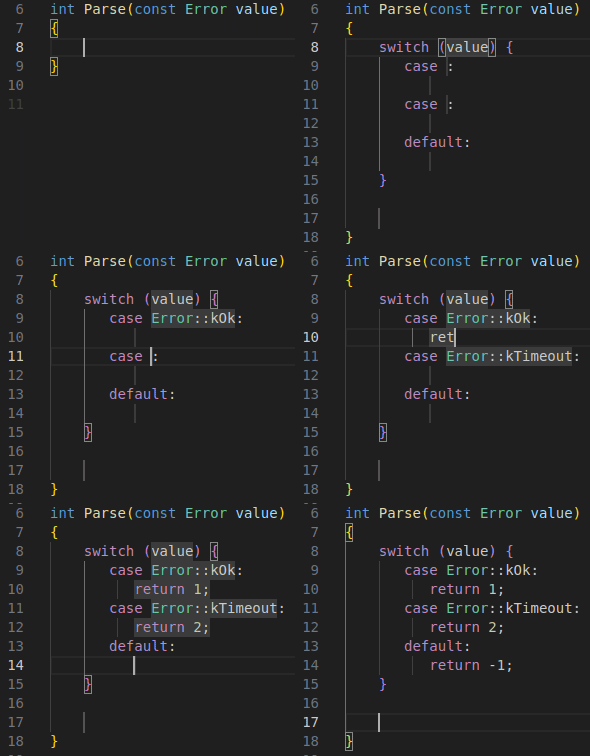
Snippet is called cswi2 (abbreviation for: C++ SWItch with 2 cases) and lets you insert a ready-to-use skeleton of switch-case statement with the number of cases specified by the trailing number (in this case 2).
Index-based for loops
Snippet is called cfori (abbreviation for: C++ FOR Indexed) and provides a full skeleton of a for loop and the most common default values.
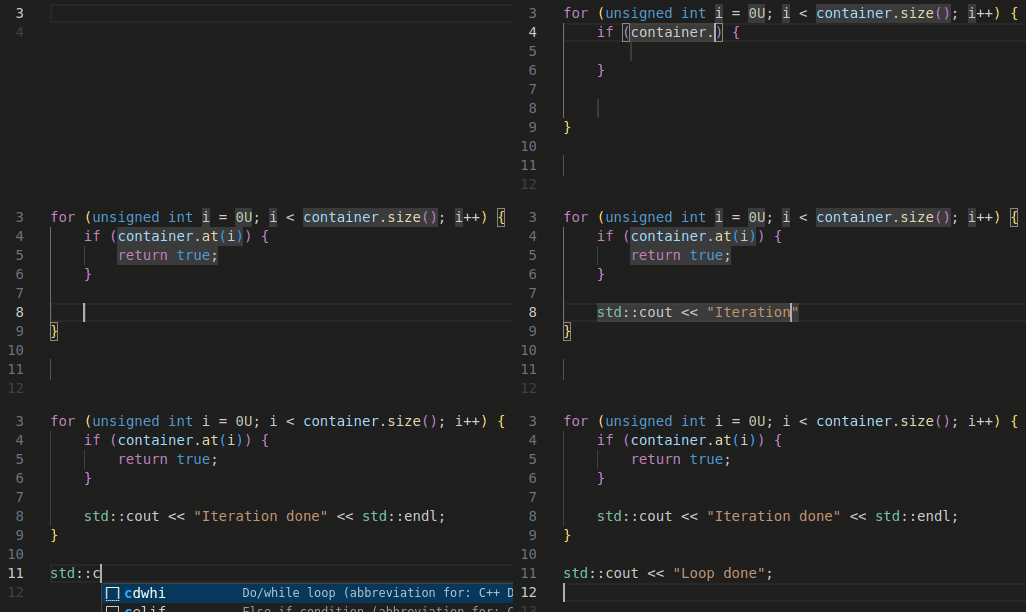
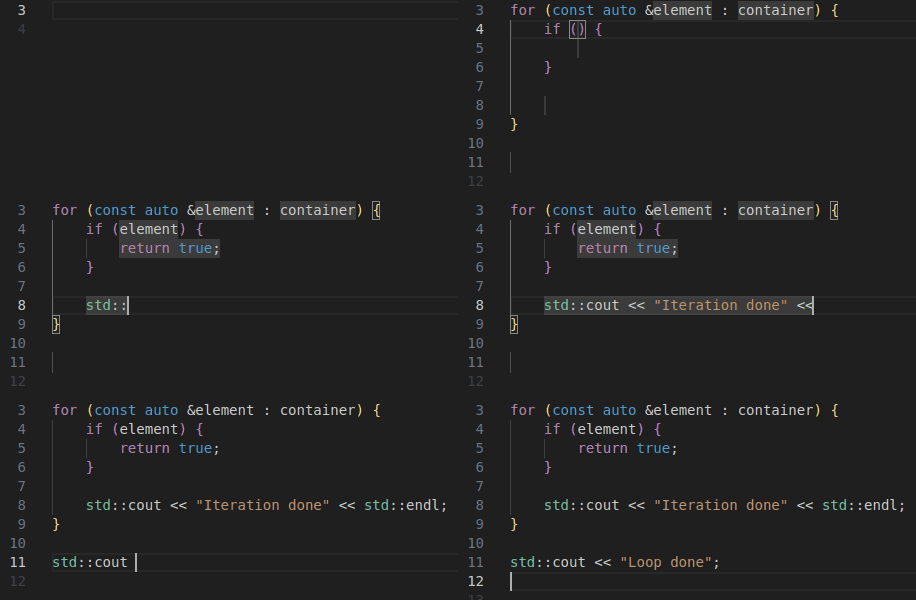
Range-based for loops
Snippet is called cfore (abbreviation for: C++ FOR Element) and lets you insert almost entire range-based for loop in its most common form.
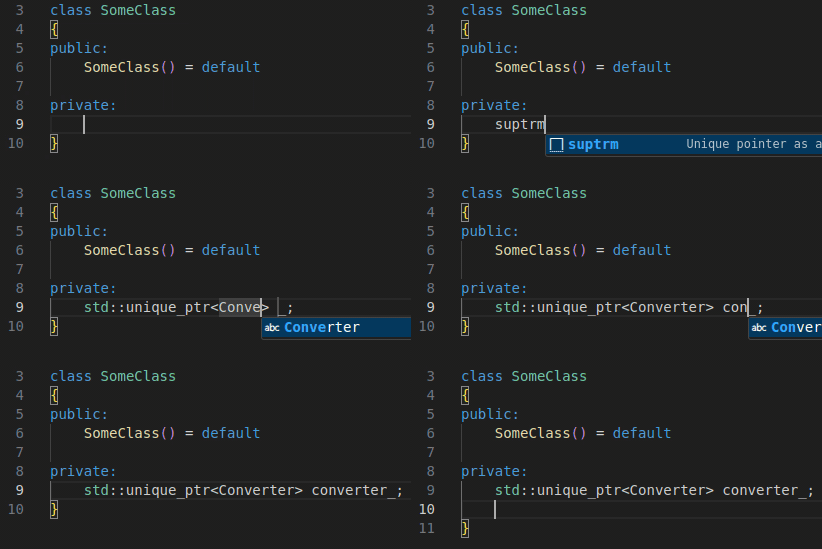
Unique pointer as a class member
Snippet is called suptrm (abbreviation for: Std Unique PoinTeR class Member) and utilizes the fact that many C++ projects require naming convention that adds an underscore at the end of every private class member.
Move variable copied to clipboard
Snippet is called somocb (abbreviation for: Std Operation MOve from ClipBoard). I often find myself in the situation in which I have a variable which I suddenly realize that needs to be moved. There are basically 2 options in such situation:
- Write
std::move(in front of the variable, jump to the end of the variable’s name and add) - Select the variable, press Ctrl + X, write
std::move()and press Ctrl + V to insert the variable between the parenthesis.
This snippet lets you make it even faster by pressing Ctrl + X and writing somocb which will insert std::move together with the name of the copied variable.

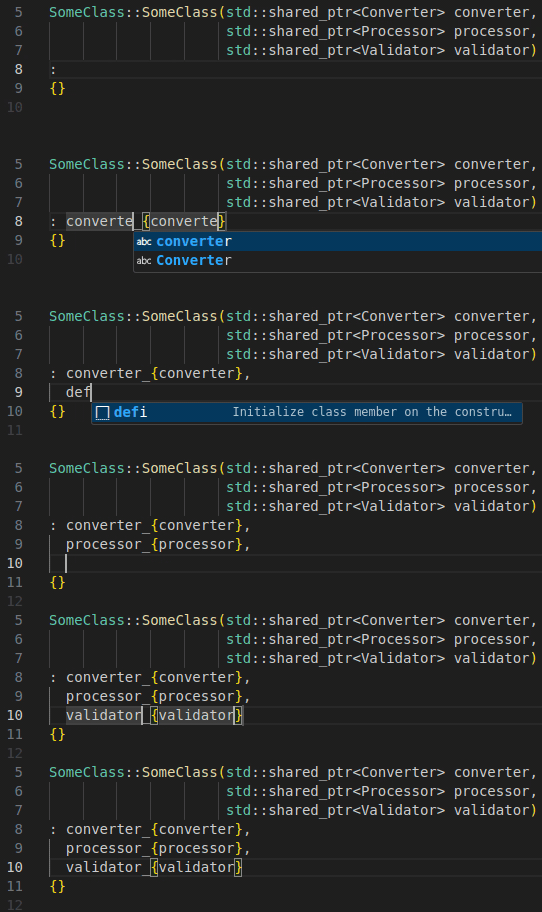
Initialize class member on the constructor’s list
Snippet is called defi (abbreviation for: DEFine Initialization of class member) and lets you initialize the class member with a constructor input arguement of the same name (except the underscore in the class member name).
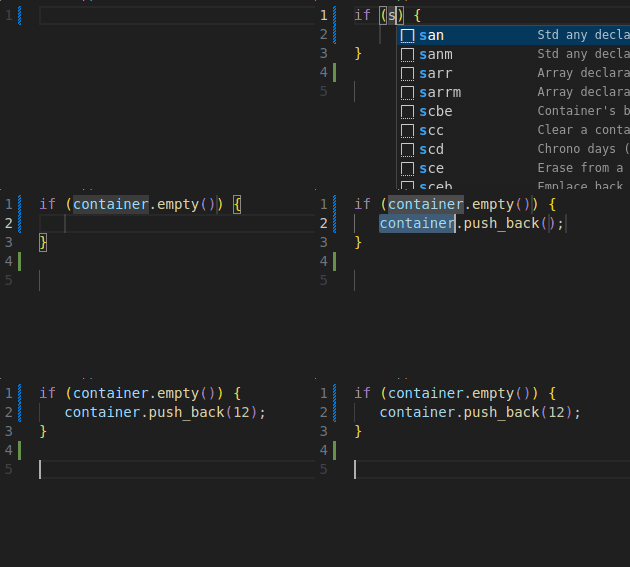
Check if container is empty
Snippet is called scem (abbreviation for: Standard Container EMpty) and provides you with an .empty() call on the standard container.
Read also:
- If not Python venv, then what?

- C++ AI-generated code that looks fast, but is actually slow

- 10 VS Code snippets essential for every Python developer

- Bug of the week #13

- git log tricks you really should know

- Surprisingly necessary explanation of Python venv
- When AI gets C++ bitmask enums almost right
- 10 VS Code snippets essential for every C++ engineer
- Storing your ATTiny program in…EEPROM?

- Bug of the week #12
- Sharing variable between bash scripts

- A 40-line LLM-based bash command executor in Python
- GTest and short-circuit evaluation in C++
- AI is powerful. Snippets are instant.
- From AUTOSAR to S-Core: the first C++ pub/sub implementation
- How to write Arduino Uno code with Python?
- Combining Bazel with Docker

- Running commands with timeout on Linux
- Running Python unit tests with CMake
- Thirdparty dependencies with FetchContent
- Bug of the week #11
- Combining CMake with Docker
- How to search the internet from Linux terminal?
- Folding expressions in C++
- How to derive from an enum in Python?
- Bug of the week #10
- Trying ROS2: client/server within a single container
- Make C++ a better place #4: Go as an alternative

- How to convert hex to dec in Linux terminal?
- Setting up a Python project with CMake
- Separating builds for different configs with Bazel
- Trying ROS2: pub/sub within a single container
- Bug of the week #9
- UDP multicasting with Python
- Destruction order vs thread safety in C++
- Let’s review some code: C++ #2

- Make C++ a better place #3: D as an alternative
- Registering callback using std::function in C++
- Bug of the week #8
- TCP client/server with Python
- Simple menus in Bash scripts with select
- Calling member function on a nullptr in C++
- Bug of the week #7
- Python lru_cache explained
- How to dockerize a Python application?
- Make C++ a better place #2: CppFront as an alternative
- Parameters combinations in GoogleTest
- Data transfer with curl
- Python reduce explained
- Bug of the week #6
- Custom literals in C++
- Linux and hash command
- 5 Python good practices which make life easier
- Let’s review some code: Python #1
- Make C++ a better place #1: What does better mean
- Enums vs enum class in C++
- Bug of the week #5
- UDP client/server with Python
- Hard links in Linux
- Functions calling order in unit tests in C++